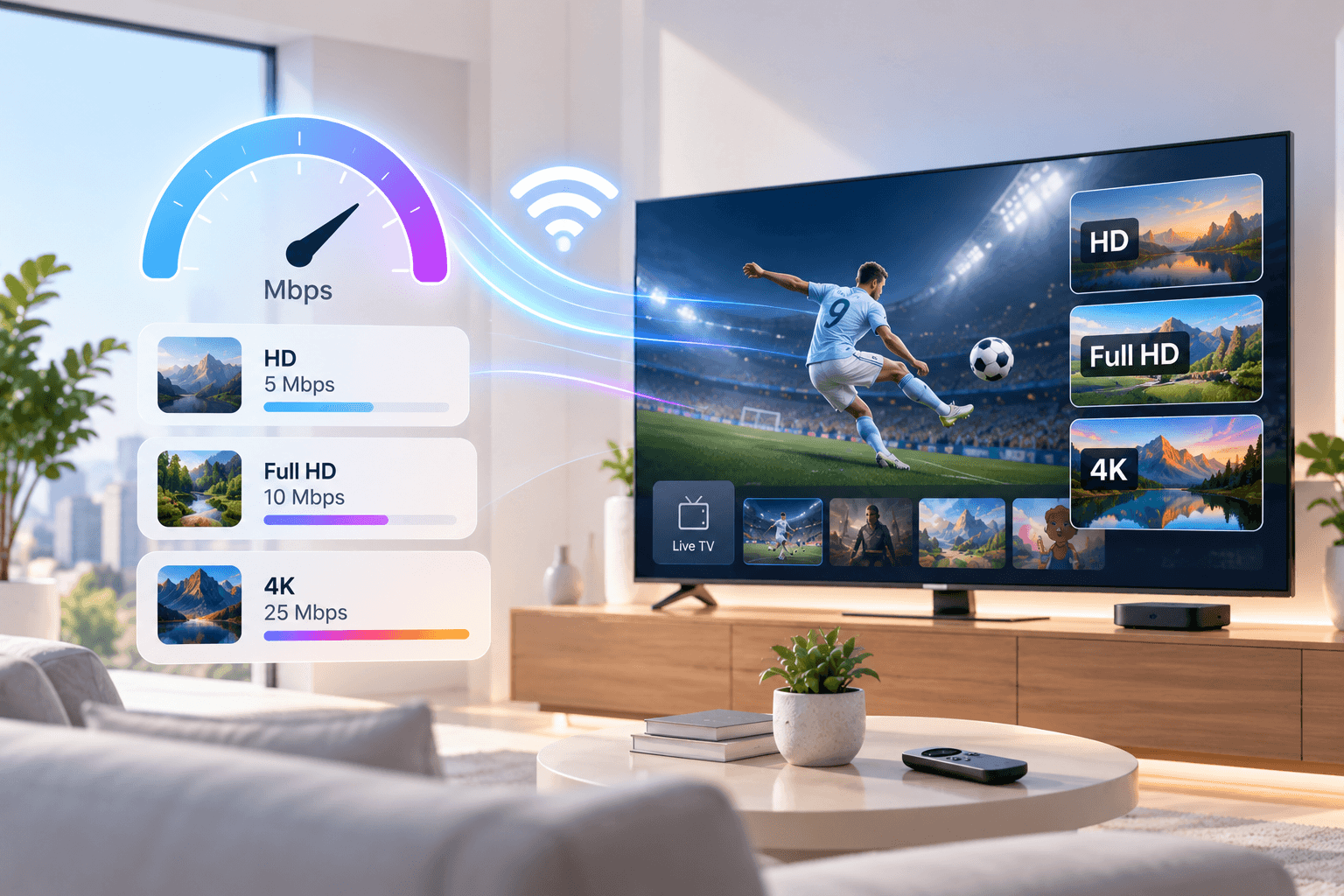
Speed is the first thing to check before you start with IPTV and the first thing people blame when a picture freezes. In practice, IPTV needs less than most expect: one Full HD channel runs comfortably on about 10 Mbps, and most home broadband in North America and Europe offers far more.
Below you will find the speed each quality level needs, a simple way to size it for a busy household, how much data IPTV uses, and why a fast plan can still stutter. These are the figures the SofaIPTV support team works with when helping customers choose a plan.
Speed per stream at a glance
Allow this much download speed for every stream playing at the same moment:
- SD: 3 Mbps.
- HD (720p): 5 Mbps.
- Full HD (1080p): 8–10 Mbps.
- 4K (2160p): 25 Mbps.
Treat these as comfortable targets, not bare minimums. A stream may play on less, but the margin soaks up the small dips every connection has, especially in the evening.
Sizing it for your household
Add up the streams that play at the same time on your busiest evening, then add about 30 percent for everything else online in your home: phones, laptops, video calls and game downloads.
- Solo viewer, one Full HD TV: 10 Mbps plus margin, so 15 Mbps or more.
- Two people on different Full HD channels: 20 Mbps plus margin, so 25–30 Mbps.
- One 4K TV and two Full HD screens: 25 + 10 + 10 = 45 Mbps plus margin, so 60 Mbps or more.
- Multi-view showing four channels on one TV: four separate streams, so up to four times the speed of one.
The number of streams you run at once is also the number of connections your plan needs. See how many IPTV connections you need for how to count them.
Download, stability and packet loss
Broadband plans quote download and upload speeds. IPTV relies almost entirely on download, since video flows from the server to you; upload matters for video calls and sending files, not watching TV.
Two less-advertised measures matter just as much:
- Stability: a line that holds a steady 30 Mbps beats one that swings between 100 and 5.
- Packet loss: when pieces of data go missing, the player waits for them and the picture freezes, even on a fast plan. Weak Wi-Fi is the usual cause.
Why a fast plan can still stutter
The speed on your bill is what arrives at the router, not at the TV. Plenty can go wrong in between:
- Wi-Fi losses: walls, floors, distance and neighbouring networks can cut the speed at the TV to a fraction of the router’s.
- Evening peak: home networks and providers are busiest from roughly 7 to 11 pm local time.
- Hidden traffic: a console update or cloud backup can take most of the bandwidth without anyone noticing.
- The streaming device: older or budget sticks have weak Wi-Fi chips and little memory.
That is why where you test matters. The IPTV buffering guide covers each of these causes with fixes.
Testing your speed the right way
- Test on the TV or stick you watch on, using a speed test app or fast.com or speedtest.net in its browser.
- Test in the evening, at your normal viewing time.
- Pause other streams and downloads in the house while testing.
- Run three tests and go by the lowest result.
- If you can, test once on Wi-Fi and once with an Ethernet cable to see what the wireless link costs you.
If the result is well above the figures here and you still see buffering, stability is the problem rather than speed, and a wired connection is the best fix.
How much data IPTV uses
Exact figures vary by channel and provider, but these are typical amounts per hour of viewing:
- SD: about 1 GB.
- HD: about 2–3 GB.
- Full HD: about 3–4 GB.
- 4K: about 7–10 GB.
Three hours of Full HD a night comes to roughly 300 GB a month. Monthly data caps are more common on some US and Canadian home internet plans than on most European fixed-line broadband, so check your plan if you watch a lot. On a capped plan or mobile data, choose HD over Full HD or 4K.
Which connection type works best
- Fibre (FTTH): the best option, fast and steady at peak time. Widely available in many European countries and growing across North America.
- Cable: the most common home broadband in the US and Canada; usually fast enough, though speeds can dip at peak time in busy neighbourhoods.
- DSL or VDSL: fine for one or two HD streams on a good line; often too slow for 4K on longer lines.
- 4G or 5G home internet: works where signal is strong, but speeds vary more and caps may apply.
- Satellite internet: newer low-orbit services can handle IPTV; older geostationary services have high delay and tight data limits.
Wi-Fi or Ethernet?
Ethernet whenever possible. A cable gives the TV your full speed with almost no packet loss, and it is the single best cure for evening buffering. Fire TV Sticks need an inexpensive Ethernet adapter, and it is worth every cent.
If a cable is out of the question, use the 5 GHz network, keep the router in the open and close to the TV, or add powerline adapters or mesh Wi-Fi. The Firestick installation guide and the guide to IPTV on Apple TV show where the network settings live on those devices.
Match quality to your connection
Most services offer the same channel in several qualities. On a borderline connection, pick HD for busy evenings: smooth HD looks far better than 4K that keeps freezing. Keep 4K for quieter times on a wired TV, and turn on frame-rate matching for sport, as explained in our guide to watching football on IPTV.
Summary
Plan on about 5 Mbps for HD, 10 Mbps for Full HD and 25 Mbps for 4K for each stream playing at once, plus roughly 30 percent spare. Test on the TV in the evening, wire it if you can, and drop to HD when the connection is under strain.
The surest test is real viewing. Request a free trial of SofaIPTV, watch a live channel at your busiest time and then pick a plan with the right number of screens.
Frequently asked questions
Is 10 Mbps enough for IPTV?
For one HD or Full HD stream, yes. Two screens at once or a 4K stream need more: about 25 Mbps for two Full HD streams and 25 Mbps or more for one 4K stream.
How many Mbps do I need for 4K IPTV?
About 25 Mbps per 4K stream, ideally over a cable. Add more if others use the internet at the same time.
Does upload speed affect IPTV?
Barely. IPTV depends on download speed. Upload matters for video calls and sending files.
My speed test is fast, so why does IPTV buffer?
The test was probably run on another device, at a quieter time or on stronger Wi-Fi than the TV gets. Test on the TV in the evening and try an Ethernet cable.
How much data does IPTV use in an hour?
Roughly 2–3 GB in HD, 3–4 GB in Full HD and 7–10 GB in 4K, varying by channel.